Helpnyx

Roles and permissions

Clear responsibilities for everyone involved

Who does what in IPAM Enterprise: your company, your admins, your engineers, your read-only users and the Helpnyx team.

Your team

Three roles for your company

One company can have as many people in each role as it needs.

Full control

Company Admin

Runs your company's account, usually a network head or operations lead.

  • Adds, edits, archives and deletes pools
  • Invites people and sets their access
  • Approves or rejects release requests
  • Sets cooling-off, alerts and two-factor rules
  • Manages billing and API keys
Day-to-day work

User

Your network, provisioning and NOC engineers.

  • Finds and assigns blocks in their pools
  • Routes blocks to devices
  • Adds customers, circuits and devices
  • Imports and exports in bulk
  • Files release requests
Read only

Viewer

Useful for support, audit, finance or management.

  • Sees the pools they are given
  • Searches for addresses and records
  • Views the audit log
  • Cannot change anything
  • Cannot file release requests

Compare

What each role can do

TaskCompany AdminUserViewer
See pools and addressesAll poolsPools they are givenPools they are given
Search for an addressYesIn their poolsIn their pools
Find and assign blocksAll poolsPools they are givenNo
Route a block to a deviceYesPools they are givenNo
Release a blockDirectlyFiles a requestNo
Approve or reject releasesYesNoNo
Add, edit or delete poolsYesNoNo
Add customers, circuits and devicesYesYesNo
Bulk import and exportYesYesNo
View the audit logYesYesYes
Open support ticketsYesYesYes
Manage team, settings and billingYesNoNo

Access per pool

Show people only the pools they work on

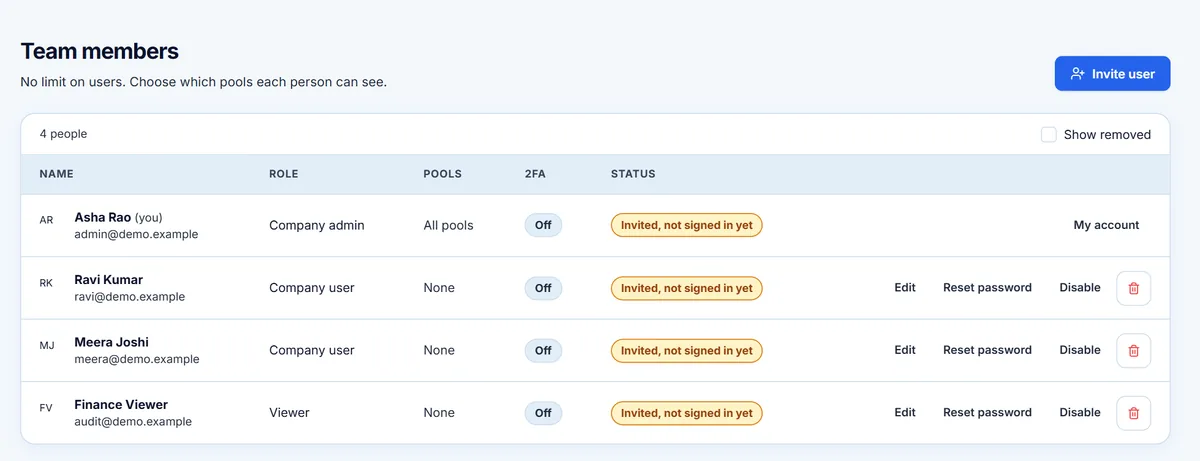
Each User and Viewer sees only the pools your Company Admin gives them. This suits teams split by region, or a contractor who works on one POP. Company Admins see every pool in the company.

  • Set access when you invite someone
  • Change it at any time
  • Someone given no pools sees none
  • Applies to searches and release requests as well
Team members list showing the pools each person can see.
Real portal screen, shown with sample data.

Beyond your team

Other people and companies in the picture

Your company

Your company has its own separate space for its pools, records, team and invoices. Other companies using the platform cannot see them.

Your ISP's customers

They do not sign in. They are records your team keeps in the portal, linked to circuits and addresses.

The Helpnyx team

In the portal this role is called Lord. It sets up approved companies and manages the platform, billing and support. Support sessions into a company are time-limited and recorded.

Thinking about how this fits your team?

Tell us how your team is organised, and we can talk through the setup.

Talk to us